Pattern Defined
Precise Definition: Agent Tool-Calling is an inference pattern where the model
is provided with a set of executable function schemas (tools), allowing it to
bridge the gap between text generation and structured action by outputting a valid
JSON object for external execution.
Problem Being Solved
Natural language is inherently “fuzzy,” but APIs are strictly deterministic. The
primary point of failure for AI agents is the Handoff Hallucination, where a
model attempts to call a function with the wrong parameters, non-existent keys, or
malformed JSON.
For a Director of Engineering, this is where the “vibe” of AI meets the reality of
production stability. As established in
Who Audits the Auditors?,
if your agent can’t reliably trigger a tool, it cannot be audited, and it certainly
cannot be trusted with the high-integrity data in the
Sovereign Vault.
Use Case
Consider an Archival Intelligence agent tasked with retrieving a digital twin of a
specific 1880s shipping ledger.
- The Model decides it needs to see the original scan of “Ledger-402.”
- The Tool is a photogrammetry-retrieval function that requires a specific UUID
and a resolution parameter.
Without a strict Tool-Calling pattern, the model might guess the UUID or forget the
resolution, causing a silent failure. With the pattern in place, the system enforces
a strict schema contract: the model either provides a valid JSON call that matches
the function’s requirements, or the system triggers an immediate, self-correcting
loop before the error ever reaches the database.
Solution
Reliable tool-calling requires a “Closed-Loop” architecture:
- Schema Definition: Provide the model with precise JSON Schema definitions
for every available tool. - Tool Selection: The model outputs a
tool_callinstead of plain text. - Execution & Feedback: The application executes the code and feeds the raw
result back to the model, allowing it to “see” the outcome of its action.
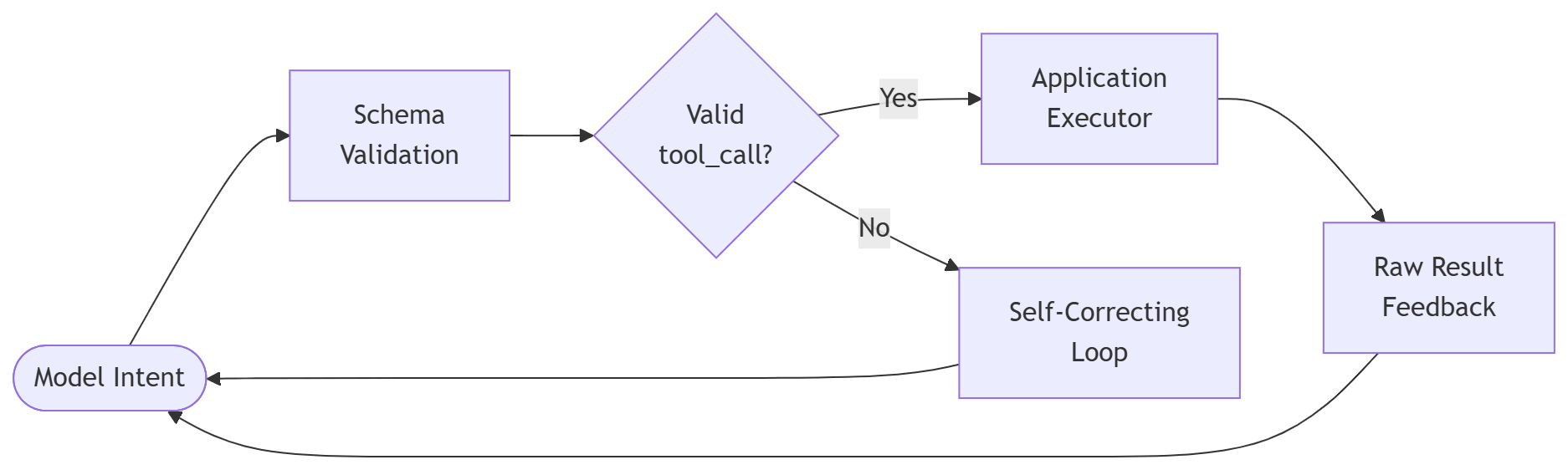
The Closed-Loop architecture: intent becomes action becomes feedback.
In an MCP (Model Context Protocol)
environment, this is the core “USB-C” moment: the protocol standardizes how these
tools are described and invoked, ensuring that your FastAPI or Node.js backend acts
as the high-integrity executor for the model’s intent.
Trade-Offs
The trade-off is System Surface Area vs. Capability. Every tool you give an
agent is a new potential security vector and a new point of failure.
For Technical Leaders, the cost lives in Schema Governance. Robust schema
contracts reduce the hallucination surface, but they add significant design overhead.
“You are essentially writing code to protect your code from your AI.”
This is where the bulk of those “two additional sprint cycles” is spent: building
the defensive validation layers that ensure the agent’s “intent” matches your
system’s “requirements.”
Summary
Agent Tool-Calling is the bridge between thinking and doing. It turns an LLM from
a sophisticated chatbot into a functional system component by enforcing the same
strict contracts we use in traditional API design.
Next Up
In two weeks, we wrap the architectural primitives with Multi-Model Routing and learn how
“The Accountant” saves your budget without sacrificing quality.
Inference Pattern Series
- Inference Renaissance
- Speculative Decoding
- Context Compression Pattern
- Hybrid Retrieval
- Agent Tool-Calling – This Post
- The Sign-and-Sieve Pattern – July 17
- Multi-Model Routing – July 31
- Event-Driven Reflection Trigger – August 14