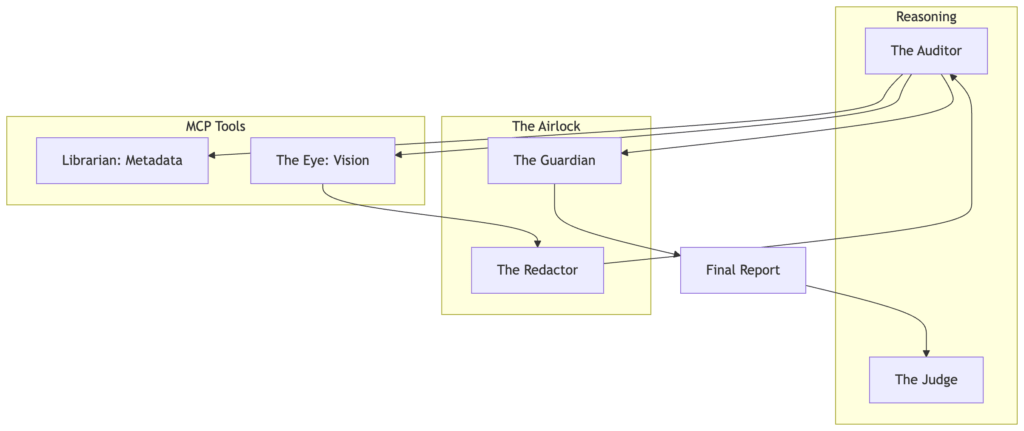

We’ve spent the last month talking about the End of Glue Code and the Enterprise AI Mesh. But if you’re a developer, you don’t just want to see the blueprint—you want to hold the tools.
Whether you are a TypeScript veteran or a Python enthusiast, building an MCP server is surprisingly simple. Today, we’re going to build the same “Hello World” tool in both languages to show you exactly how the protocol abstracts away the complexity.
1. The TypeScript Approach (Node.js)
TypeScript is the “native” language of the Model Context Protocol, and the @modelcontextprotocol/sdk is exceptionally robust for high-performance enterprise tools.
Prerequisites:
npm install @modelcontextprotocol/sdk zod
The Code:
import { Server } from "@modelcontextprotocol/sdk/server/index.js";
import { StdioServerTransport } from "@modelcontextprotocol/sdk/server/stdio.js";
import { z } from "zod";
const server = new Server({
name: "hello-world-server",
version: "1.0.0",
}, {
capabilities: { tools: {} }
});
// Define a simple greeting tool
server.tool(
"greet_user",
{ name: z.string().describe("The name of the person to greet") },
async ({ name }) => {
return {
content: [{ type: "text", text: `Hello, ${name}! Welcome to the MCP Mesh.` }]
};
}
);
async function main() {
const transport = new StdioServerTransport();
await server.connect(transport);
}
main().catch(console.error);
2. The Python Approach
For data scientists and AI engineers, the Python SDK offers a beautifully decorative approach. It feels more “agent-native” and integrates seamlessly with existing AI libraries.
Prerequisites:
pip install mcp
The Code:
import asyncio
from mcp.server.fastmcp import FastMCP
# Initialize FastMCP - the "Quick Start" wrapper
mcp = FastMCP("HelloWorld")
@mcp.tool()
async def greet_user(name: str) -> str:
"""Greets a user by name."""
return f"Hello, {name}! Welcome to the MCP Mesh."
if __name__ == "__main__":
mcp.run(transport='stdio')
Side-by-Side: Which Should You Choose?
Feature
TypeScript (Standard SDK)
Python (FastMCP)
Best For
High-performance, Type-safe tools
Rapid prototyping, AI logic
Validation
Zod (Explicit & Strict)
Pydantic / Type Hints (Implicit)
Verbosity
Moderate (Structured)
Minimal (Decorator-based)
Transport
STDIO, SSE, Custom
STDIO, SSE
How to Test Your Server
Once you’ve saved your code, you don’t need a complex frontend to test it. Use the MCP Inspector:
# For TypeScript
npx @modelcontextprotocol/inspector node build/index.js
# For Python
npx @modelcontextprotocol/inspector python your_script.py
This will launch a local web interface where you can perform the “Protocol Handshake” and trigger your tools manually. It’s the best way to verify your “Zero-Glue” infrastructure before connecting it to an agent.
Conclusion
The “Zero-Glue” architecture isn’t about which language you use—it’s about the Protocol. As you can see, the logic for the “Hello World” tool is nearly identical in both versions. The Model Context Protocol ensures that no matter how you build your tools, your agents can discover and use them in a standardized way.
Ready to build your own?
Check out the reference repo for more complex examples, including Notion and Oracle 26ai integrations.
Architecting the Zero-Glue AI Stack with the Model Context Protocol
A practical look at building protocol-driven AI systems with the Model Context Protocol (MCP).
Two years ago, if you wanted an AI agent to perform a task—auditing a rare book archive, updating a Notion database, or reconciling records in a system—you had to write a custom integration layer.
Traditional AI integrations (M × N complexity)
Figure 1: The exponential complexity of traditional point-to-point AI integrations, where every new model requires a unique connector for every available tool.
You spent weekends mapping JSON fields to LLM function calls, building fragile wrappers around APIs, and hoping the upstream interface didn’t change.
When it did, everything broke.
We were building a tangled web of point-to-point integrations.
In software engineering terms, this is the M × N problem:
M models x N tools = MxN integrations
Every new model required new connectors.
Every new tool required new wrappers.
By 2026, that architecture has become a technical liability.
A different model is emerging: protocol-based AI systems.
And the protocol at the center of that shift is the Model Context Protocol (MCP).
The Protocol Shift: What MCP Actually Is
The Model Context Protocol is an open standard for connecting AI systems to tools and data.
The easiest analogy is USB-C for AI infrastructure.
Where does MCP actually sit in an AI system?
The MCP architecture stack: agents reason about tasks while MCP standardizes access to tools, resources, and enterprise data.
Instead of building custom integrations between every model and every tool, developers implement a single MCP server that exposes capabilities in a standardized way.
Agents then discover and use those capabilities dynamically.
In this architecture:
Protocol-based architecture (M + N complexity)
Figure 2: The Model Context Protocol (MCP) acts as a universal interface, allowing a single agent to dynamically discover and orchestrate tools, resources, and prompts via a unified server.
Rather than hard-coding what a model can access, the server describes its capabilities to the agent.
When an agent connects, it performs a protocol handshake and discovers exactly what is available.
No manual wiring required.
Figure 3: Comparing the linear scaling of MCP (M + N) against the unsustainable growth of traditional manual wiring (M x N).
The Three Primitives of MCP
MCP works because it simplifies tool integration into three core primitives.
1. Resources (The Nouns)
Resources are structured data exposed to the agent.
Examples might include:
a rare book’s metadata record
a digitized archival scan
a Notion page
a database entry
The key point: the agent doesn’t scrape or guess.
It accesses structured resources intentionally exposed by the server.
2. Tools (The Verbs)
Tools are executable actions.
An MCP tool is essentially a function with a strict schema that tells the agent how to call it.
Example:
// Define a tool in the MCP Forensic Analyzer
server.tool(
"audit_book",
{ book_id: z.string().describe("The archival ID of the volume") },
async ({ book_id }) => {
const metadata = await archive.getMetadata(book_id);
const result = await forensicEngine.audit(metadata);
return {
content: [{ type: "text", text: JSON.stringify(result) }]
};
}
);
Because tools include a JSON schema, the model knows:
what parameters exist
which are required
what type of result will be returned
This dramatically improves reliability compared to traditional prompt-based tool use.
3. Prompts (The Recipes)
Prompts define reusable workflows.
Instead of embedding a fragile 500-line system prompt inside your application, you can expose a structured prompt template.
Example:
Forensic Audit Template
- Retrieve metadata
- Check publication year consistency
- Verify publisher watermark
- Compare against known first-edition patterns
The agent can then dynamically load and use that prompt when performing an audit.
Case Study: The MCP Forensic Analyzer
To explore MCP in practice, I built an MCP Forensic Analyzer.
The system analyzes archival records and identifies inconsistencies between historical metadata and physical characteristics.
Before MCP, implementing this workflow required a large amount of orchestration code:
Fetch metadata
Normalize fields
Construct prompt
Send to LLM
Parse result
Retry if formatting failed
With MCP, the architecture becomes dramatically simpler.
The agent discovers available tools and invokes them directly.
The MCP Discovery Loop
Instead of manually wiring integrations, the agent follows a protocol lifecycle.
Protocol Negotiation
The client and server establish a connection
(STDIO for local tools or SSE for remote services).
Schema Exchange
The server returns a manifest of available tools, resources, and prompts.
Intent Mapping
The agent matches the user request to the appropriate tool.
Tool Execution
The tool is invoked with structured parameters.
Figure 4: The MCP Handshake and Discovery Loop. The agent identifies capabilities at runtime rather than relying on hard-coded instructions.
Unlike traditional systems that cram every tool into the system prompt, MCP allows the agent to fetch the tool definition only when its reasoning engine determines it is required. The important shift here is that the agent discovers the system instead of being manually wired to it.
Why MCP Is Emerging Now
Three shifts in AI architecture made MCP almost inevitable.
Agents Need Tool Discovery
Hard-coded function lists don’t scale as systems grow.
Agents need the ability to discover capabilities dynamically.
Context Windows Exploded
Modern models can reason over large tool catalogs and schemas.
Instead of embedding everything in a single prompt, agents can now navigate structured capability manifests.
Enterprises Need Governance
Prompt-level guardrails are brittle.
Protocol-level permissions are enforceable.
MCP moves governance into the infrastructure layer.
MCP + Agentic Memory
Another emerging pattern in 2026 is combining MCP with agent memory systems.
MCP provides the agent’s eyes and hands.
Memory provides the identity.
In the MCP Forensic Analyzer, memory operates on two levels.
Working Memory
– The specific book currently under investigation.
Semantic Memory
– A vector database storing historical observations.
Example:
“First editions from this publisher often contain a watermark on page 12.”
As the system performs more audits, it accumulates domain-specific knowledge.
The agent doesn’t just run tools.
It develops forensic intuition.
Enterprise Governance: Why REST Isn’t Enough
A common question is:
“Why not just use REST APIs?”
REST APIs were designed for application integrations, where developers explicitly code each interaction.
MCP targets a different use case: machine-to-machine autonomy.
Three architectural advantages emerge.
1. The M×N → M+N Scaling Shift
Without MCP:
M models × N tools = M×N integrations
With MCP:
M models + N MCP servers = M+N integrations
A new model can immediately interact with existing systems without additional integration work.
2. Permissioned Recall
Enterprise systems require strict data boundaries.
An MCP server can enforce Row-Level Security (RLS) at the protocol layer.
If a junior auditor runs the agent, the server only returns resources they are authorized to access.
The agent literally cannot see restricted data.
3. Auditability
Enterprise AI systems must be explainable.
MCP provides structured logging for:
tool calls
resource access
returned data
This creates a defensible audit trail of every decision made by the agent.
Up Next in the “Zero-Glue” Series:
– The Forensic Team: Multi-Agent Handoffs and Orchestration.
– AI on a Toaster: Running SLMs on the Edge.
– The Secure Archive: Governance with Oracle 26ai.
Cookie Consent
We use cookies to improve your experience on our site. By using our site, you consent to cookies.
Contains information about the traffic source or campaign that directed user to the website. The cookie is set when the GA.js javascript is loaded and updated when data is sent to the Google Anaytics server
6 months after last activity
__utmv
Contains custom information set by the web developer via the _setCustomVar method in Google Analytics. This cookie is updated every time new data is sent to the Google Analytics server.
2 years after last activity
__utmx
Used to determine whether a user is included in an A / B or Multivariate test.
18 months
_ga
ID used to identify users
2 years
_gali
Used by Google Analytics to determine which links on a page are being clicked
30 seconds
_ga_
ID used to identify users
2 years
_gid
ID used to identify users for 24 hours after last activity
24 hours
_gat
Used to monitor number of Google Analytics server requests when using Google Tag Manager
1 minute
_gac_
Contains information related to marketing campaigns of the user. These are shared with Google AdWords / Google Ads when the Google Ads and Google Analytics accounts are linked together.
90 days
__utma
ID used to identify users and sessions
2 years after last activity
__utmt
Used to monitor number of Google Analytics server requests
10 minutes
__utmb
Used to distinguish new sessions and visits. This cookie is set when the GA.js javascript library is loaded and there is no existing __utmb cookie. The cookie is updated every time data is sent to the Google Analytics server.
30 minutes after last activity
__utmc
Used only with old Urchin versions of Google Analytics and not with GA.js. Was used to distinguish between new sessions and visits at the end of a session.
End of session (browser)
Marketing cookies are used to follow visitors to websites. The intention is to show ads that are relevant and engaging to the individual user.
X Pixel enables businesses to track user interactions and optimize ad performance on the X platform effectively.
This cookie is set by X to identify and track the website visitor. Registers if a users is signed in the X platform and collects information about ad preferences.
2 years
personalization_id
Unique value with which users can be identified by X. Collected information is used to be personalize X services, including X trends, stories, ads and suggestions.
2 years
external_referer
Our Website uses X buttons to allow our visitors to follow our promotional X feeds, and sometimes embed feeds on our Website.