The Backyard Quarry, Part 3: Capturing the Physical World

In the previous post, we designed a schema for representing rocks as structured data.

On paper, everything looked clean.

Each rock would have:

  • an identifier
  • dimensions
  • weight
  • metadata
  • possibly images or even a 3D model

The structure made sense.

The problem was getting the data.

From Schema to Reality

Designing a schema is straightforward.

You can sit down with a notebook or a whiteboard and define exactly what you want the system to store.

Capturing real-world data is a different problem entirely.

The moment you step outside, a few complications become obvious.

Lighting changes.

Objects aren’t uniform.

Measurements are approximate.

And perhaps most importantly:

The dataset doesn’t behave consistently.

The Scale Problem

The Backyard Quarry dataset spans a wide range of sizes:

pea-sized
hand-sized
wheelbarrow-sized
engine-block-sized

That variability immediately affects how data can be captured.

Small rocks can be photographed on a table.

Medium rocks might need to be placed on the ground with careful framing.

Large rocks don’t move easily at all.

Each category introduces different constraints.

This is a pattern that shows up in many real-world systems.

The same pipeline rarely works for every object.

Image Capture

The simplest form of data capture is photography.

Take a few images of each rock from different angles.

Store them.

Attach them to the record.

Even this introduces decisions:

  • how many images per object?
  • what angles?
  • what lighting conditions?
  • what background?

Inconsistent capture leads to inconsistent data.

And inconsistent data leads to unreliable systems.

Introducing Photogrammetry

If we take the idea a step further, we can generate a 3D model of each rock.

Photogrammetry works by combining multiple images to reconstruct the shape of an object.

Conceptually:

  • take overlapping photos
  • feed them into a processing tool
  • generate a 3D mesh

This produces a much richer representation than a single image.

But it also introduces:

  • processing time
  • storage requirements
  • failure cases

Not every rock will produce a clean model.

The Capture Pipeline

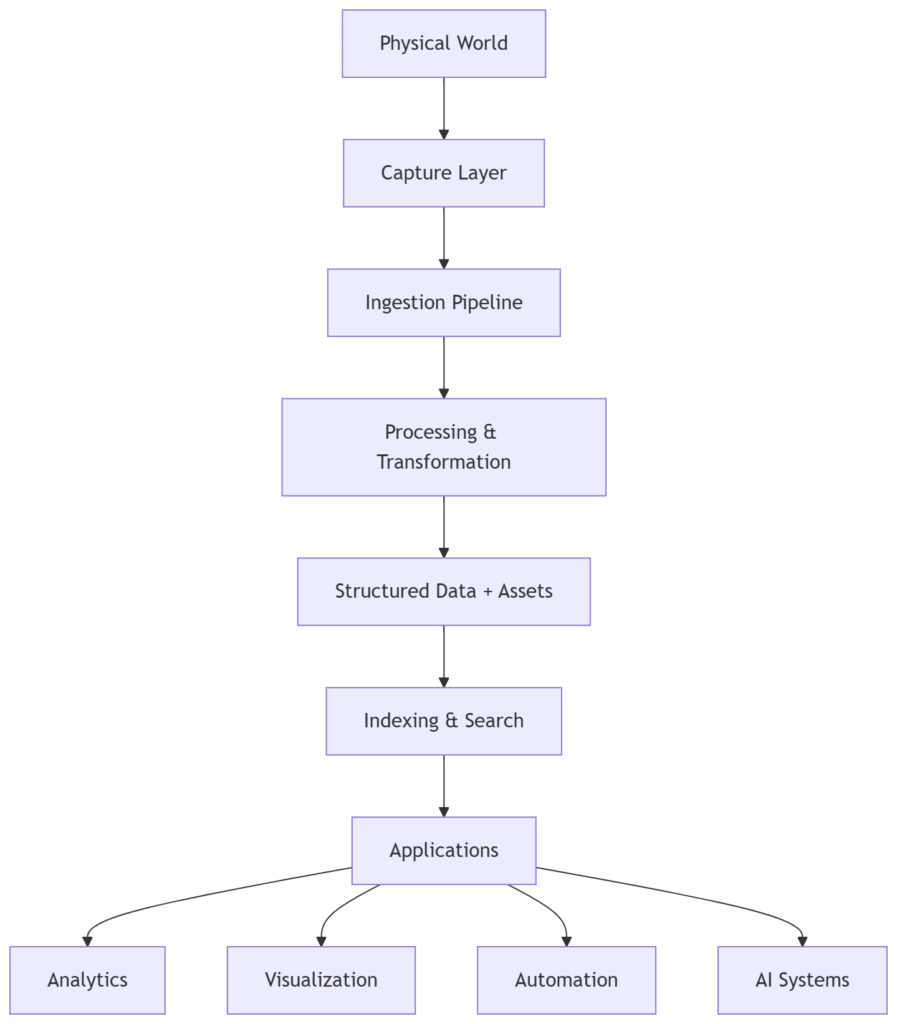
At this point, the process starts to look like a pipeline.

Diagram showing a data pipeline for capturing physical objects, including image capture, photogrammetry processing, metadata extraction, and storage.
A simplified pipeline for turning a physical object into structured data and associated assets.

Each step transforms the data in some way.

The output of one stage becomes the input of the next.

This is a common pattern in data engineering.

The difference here is that the input isn’t a clean dataset.

It’s the physical world.

Imperfect Data

No matter how carefully you design the pipeline, real-world data introduces imperfections.

Examples:

  • missing images
  • inconsistent lighting
  • partially occluded objects
  • measurement errors

A rock might be:

  • too reflective
  • too uniform in texture
  • partially buried
  • awkwardly shaped

All of these affect the output.

This means the system has to tolerate incomplete or imperfect data.

Which leads to an important realization:

Data systems are rarely about perfect data.
They are about handling imperfect data gracefully.

Storage Considerations

Once data is captured, it needs to be stored.

Different types of data behave differently:

  • metadata → small, structured, easy to query
  • images → larger, unstructured
  • 3D models → even larger, more complex

This reinforces a pattern introduced earlier:

Separate structured data from large assets.

Store references rather than embedding everything directly.

A Familiar Pattern

At this point, the Backyard Quarry pipeline looks surprisingly familiar.

It resembles systems used for:

  • scanning historical artifacts
  • capturing industrial parts
  • generating 3D models for manufacturing
  • building datasets for computer vision

The specifics change.

The pattern remains the same.

What Comes Next

Once data is captured and stored, the next problem emerges.

How do we find anything?

A dataset of a few rocks is manageable.

A dataset of hundreds or thousands quickly becomes difficult to navigate without structure.

In the next post, we’ll look at how to index and search the dataset — and how even a pile of rocks benefits from thoughtful retrieval systems.

And somewhere along the way, it becomes clear that the hard part isn’t designing the schema.

It’s building systems that can reliably turn messy reality into usable data.

Miss Part of the Series?

Facebooktwitterredditlinkedinmail

The Backyard Quarry, Part 2: Designing a Schema for Physical Objects

In the first post of this series we set the stage for the Backyard Quarry project.

Once you decide every rock in the yard should have a record, the next question appears immediately:

What exactly should we record?

It’s a deceptively simple question. And like most simple questions in engineering, it opens the door to a surprisingly large number of decisions.

The First Attempt

The most straightforward approach is to keep things minimal.

Each rock gets an identifier and a few attributes.

Something like:

rock_id
size
price

At first glance, this seems reasonable.

We can identify the rock. We can describe it in some vague way. We can assign a price.

But this model breaks down almost immediately.

“Size” is ambiguous. Is that weight? Volume? Longest dimension? All of the above?

Two rocks of the same “size” might behave very differently when you try to move them.

And more importantly, this model doesn’t capture anything about the rock beyond its most basic characteristics.

It’s enough to sell a rock.

It’s not enough to understand one.

Expanding the Model

To make the system more useful, we need to be more explicit.

A slightly richer model might look like this:

rock_id
weight_lb
length_cm
width_cm
height_cm
color
rock_type
location_found
status

Now we’re getting somewhere.

We can distinguish between rocks that look similar but behave differently.

We can track where each rock came from.

We can start to answer questions like:

  • How many rocks do we have in a given area?
  • What size distribution does the dataset have?
  • Which rocks are suitable for different uses?

This is the point where the rock pile starts to feel less like a random collection and more like a dataset.

The Object Data Model

At a higher level, what we’re really doing is separating a physical object into a few distinct components.

Diagram showing how a physical rock is represented as a digital record with metadata, images, and a 3D model.
A simple model for representing a physical object as structured data and associated assets.

Each rock has:

  • metadata describing its properties
  • images representing its appearance
  • optionally, a 3D model capturing its shape

This separation turns out to be important.

Metadata is small, structured, and easy to query.

Images and 3D models are large, unstructured assets that need to be stored and referenced.

Keeping those concerns separate is a pattern that shows up in many real-world systems.

The Identity Problem

Once the schema starts to take shape, another question appears.

How do we uniquely identify a rock?

There are a few options:

  • sequential IDs (rock_001, rock_002)
  • UUIDs
  • physical tags attached to rocks
  • some form of image-based identification

For a small backyard dataset, almost anything works.

But the choice matters more as the system grows.

Sequential IDs are easy to read but require coordination.

UUIDs are globally unique but harder to work with manually.

Physical tags introduce a connection between the digital record and the real-world object.

Even in a simple system, identity becomes a design decision.

Classification: The Quarry Taxonomy

At some point, it becomes useful to introduce categories.

Originally this was just a convenience.

But like many things in this project, it quickly became something more formal.

A simple classification system might look like this:

Class 0 — Pebble
Class 1 — Hand Sample
Class 2 — Landscaping Rock
Class 3 — Wheelbarrow Class
Class 4 — Engine Block Class
Class 5 — Heavy Machinery Class

Each class roughly corresponds to how the rock is handled.

This turns out to be surprisingly useful.

Instead of asking for exact dimensions, we can filter by class:

  • “Show me all Pebble Class rocks”
  • “Exclude anything above Wheelbarrow Class”

In other words, we’ve introduced a derived attribute — something computed from the underlying data rather than stored arbitrarily.

This is exactly how classification systems evolve in real datasets.

Thinking About Lifecycle

Rocks don’t change much physically, but their role in the system does.

A rock might move through states like:

collected
cataloged
listed_for_sale
sold

Tracking this lifecycle introduces another dimension to the data.

Now we’re not just modeling objects.

We’re modeling *objects over *.

Even in a simple system, state and transitions begin to matter.

The Tradeoffs

At this point, the schema is already doing useful work.

But it’s also clear that there’s no perfect design.

Every decision involves tradeoffs:

  • more fields vs simplicity
  • normalized structure vs ease of use
  • flexibility vs consistency

The goal isn’t to design the perfect schema on the first try.

The goal is to design something that can evolve.

Because as soon as we start capturing real data, we’ll learn what we got wrong.

What Comes Next

With a basic schema in place, the next challenge becomes obvious.

We know what we want to store.

Now we need to figure out how to capture it.

In the next post, we’ll look at how to turn a physical rock into images, measurements, and potentially a 3D model — and how that process introduces its own set of constraints.

Because it turns out that collecting data from the physical world is rarely as clean as designing a schema on paper.

Facebooktwitterredditlinkedinmail