The Local Eye (Sovereign Vision)

We’ve built a system that is Reliable, Affordable, and Governed. But until now, our Forensic Team has been “blind.” It could only reconcile text-based metadata.

In the world of rare book forensics, the text is only half the story. The typography, paper grain, and binding texture are the true “fingerprints.” However, sending high-resolution, proprietary scans of a $50,000 asset to a cloud-based LLM is a Data Sovereignty nightmare.

Today, we introduce The Local Eye: Edge-based Multimodal Vision that processes pixels without letting them leak into the cloud.

The Sovereignty Gap in Multimodal AI

Most multimodal implementations send raw images directly to frontier models (like GPT-4o). For an enterprise, this is a liability.

  1. Intellectual Property: Who owns the training data rights to the scan?
  2. Privacy: Does the image contain metadata or background information that violates NDAs?
  3. Cost: Sending 10MB 4K images for every query is an “Accountant’s” nightmare.

Implementing “Feature Extraction” at the Edge

Instead of sending the image to the cloud, we use Llama 3.2 Vision running locally via Ollama. Our MCP server acts as an “Airlock.”

The Handshake:
Normalization: The sharp library resizes and standardizes the forensic scan locally.
Local Inference: The Vision SLM analyzes the image and generates a text-based “Feature Map.”
Metadata Egress: Only the textual description is passed to the reasoning agents. Even if The Accountant routes the task to a Cloud model for deep analysis, the cloud only sees our description, never the pixels.

Architectural diagram of the 'Local Eye' workflow. An artifact image is processed locally using the Sharp library and Llama 3.2 Vision. Only the resulting text metadata is allowed to pass through the security airlock to cloud-based reasoning models, ensuring the original pixels never leave the local environment.
The Sovereign Vision Workflow—Extracting intelligence at the edge to prevent data leakage.

The Sovereign Vision Workflow—Extracting intelligence at the edge to prevent data leakage.
Architectural diagram of the 'Local Eye' workflow. An artifact image is processed locally using the Sharp library and Llama 3.2 Vision. Only the resulting text metadata is allowed to pass through the security airlock to cloud-based reasoning models, ensuring the original pixels never leave the local environment.

In code we might have something like this then:

// From src/index.ts: The Vision Airlock
async function analyzeArtifactVision(imagePath: string, focus: string) {
  const processedImage = await sharp(imagePath).resize(512, 512).toBuffer();

  // Local-only call to Ollama
  const description = await ollama.generate({
    model: 'llama3.2-vision',
    prompt: `Analyze the ${focus} of this artifact.`,
    images: [processedImage.toString('base64')]
  });

  return description; // Pixels stay here. Only text leaves.
}

The “Zero-Pixel” Policy

The goal is to maximize Intelligence while minimizing Exposure. By implementing Local Vision, we treat the cloud as a “Reasoning Utility,” not a “Data Store.” We send it the logic puzzle, but we never give it the raw forensic evidence. We gain the power of frontier-model reasoning without the risk of data harvesting.

Developer Lessons: The “Latency of Locality”

In building the Sovereign Vault, we learned that ‘Data Sovereignty’ has a physical cost: Time.

While a cloud-based API might analyze a 4K image in seconds, running a deep-dive OCR and visual analysis on local consumer hardware using Llama 3.2-Vision takes significantly longer. We had to tune our “Airlock” timeouts—raising the ceiling from 120 seconds to 300 seconds—to give the local “Eye” enough time to process complex handwriting on a standard CPU.

Additionally, we realized that our error logs were a potential privacy leak. We implemented Log Truncation to ensure that even our failures respect the Sovereign Vault’s privacy mandate.

The “Zero-Glue” Discovery

In a traditional setup, adding vision would require rewriting the orchestrator’s core logic. Because we use the Model Context Protocol, the orchestrator simply asked the server: “What can you do?”. The server replied with the analyze_artifact_vision manifest. The agent then dynamically decided to use this new “Eye” to investigate the Gatsby image. No new glue code was written to connect the vision model to the reasoning brain.

Case Study: The Gatsby Inscription

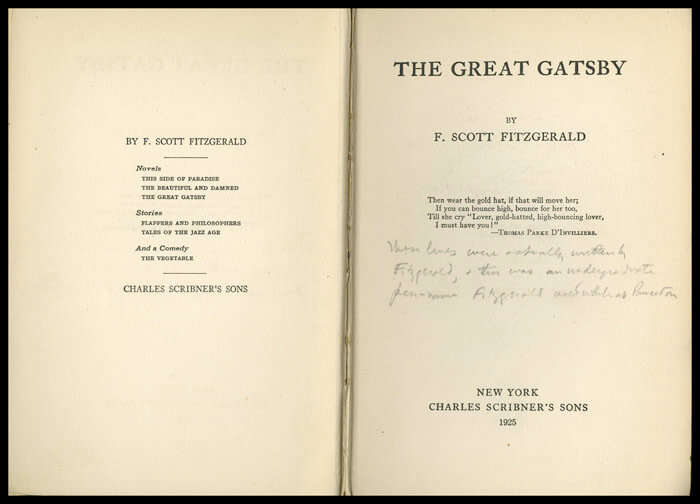
To test our Sovereign Vault, we ran a forensic audit on a high-value first edition of The Great Gatsby. Our local Vision Agent detected something anomalous on the title page: a cursive, multi-line inscription.

An image of The Great Gatsby copyright page
Image credit: [University of Southern Mississippi Special Collections](https://lib.usm.edu/spcol/exhibitions/item_of_the_month/iotm_june_2021.html) (June 2021 Item of the Month)

The Sovereign Trace

When we ran the analyze_artifact_vision tool, the local Llama 3.2 Vision model performed a deep scan and returned a fascinating finding:

**Visual Findings: Handwritten Inscription**
* Location: Right-hand margin of title page
* Medium: Faint pencil, cursive script
* Transcribed Content: "Then we are not alone at all when we remember that we have in our hearts that something so precious..."

Why this matters: Notice that the model didn’t just see “scribbles.” It attempted to transcribe a 40-word passage. Crucially, the Forensic Analyst (Claude) recognized that this text does not exist in any canonical version of The Great Gatsby.

This is a massive forensic win. The “Eye” identified a potential fabricated provenance or a non-standard owner intervention. Because this happened inside our “Airlock,” the specific handwriting and the non-canonical text were captured without ever touching a cloud API.

The Architect’s Trade-off: The Reasoning Gap
While our local Llama 3.2-Vision is an incredible “Eye,” it occasionally faces a Reasoning Gap. In certain runs, it may identify a note as “illegible” or produce repetitive output due to CPU thermal throttling or model constraints.

Instead of hallucinating a “clean” signature, our system is designed to Safe-Fail. It flags the finding as “Indeterminate” and triggers a High-Severity Human Authorization request.

The Governance Challenge: We now have a transcribed inscription that might contain a previous owner’s private thoughts or names. If we simply passed this output to an LLM for summarization, we would have leaked a private message to a third-party server. This discovery sets the stage for our next architectural layer: The Redactor.

Facebooktwitterredditlinkedinmail

The Backyard Quarry, Part 3: Capturing the Physical World

In the previous post, we designed a schema for representing rocks as structured data.

On paper, everything looked clean.

Each rock would have:

  • an identifier
  • dimensions
  • weight
  • metadata
  • possibly images or even a 3D model

The structure made sense.

The problem was getting the data.

From Schema to Reality

Designing a schema is straightforward.

You can sit down with a notebook or a whiteboard and define exactly what you want the system to store.

Capturing real-world data is a different problem entirely.

The moment you step outside, a few complications become obvious.

Lighting changes.

Objects aren’t uniform.

Measurements are approximate.

And perhaps most importantly:

The dataset doesn’t behave consistently.

The Scale Problem

The Backyard Quarry dataset spans a wide range of sizes:

pea-sized
hand-sized
wheelbarrow-sized
engine-block-sized

That variability immediately affects how data can be captured.

Small rocks can be photographed on a table.

Medium rocks might need to be placed on the ground with careful framing.

Large rocks don’t move easily at all.

Each category introduces different constraints.

This is a pattern that shows up in many real-world systems.

The same pipeline rarely works for every object.

Image Capture

The simplest form of data capture is photography.

Take a few images of each rock from different angles.

Store them.

Attach them to the record.

Even this introduces decisions:

  • how many images per object?
  • what angles?
  • what lighting conditions?
  • what background?

Inconsistent capture leads to inconsistent data.

And inconsistent data leads to unreliable systems.

Introducing Photogrammetry

If we take the idea a step further, we can generate a 3D model of each rock.

Photogrammetry works by combining multiple images to reconstruct the shape of an object.

Conceptually:

  • take overlapping photos
  • feed them into a processing tool
  • generate a 3D mesh

This produces a much richer representation than a single image.

But it also introduces:

  • processing time
  • storage requirements
  • failure cases

Not every rock will produce a clean model.

The Capture Pipeline

At this point, the process starts to look like a pipeline.

Diagram showing a data pipeline for capturing physical objects, including image capture, photogrammetry processing, metadata extraction, and storage.
A simplified pipeline for turning a physical object into structured data and associated assets.

Each step transforms the data in some way.

The output of one stage becomes the input of the next.

This is a common pattern in data engineering.

The difference here is that the input isn’t a clean dataset.

It’s the physical world.

Imperfect Data

No matter how carefully you design the pipeline, real-world data introduces imperfections.

Examples:

  • missing images
  • inconsistent lighting
  • partially occluded objects
  • measurement errors

A rock might be:

  • too reflective
  • too uniform in texture
  • partially buried
  • awkwardly shaped

All of these affect the output.

This means the system has to tolerate incomplete or imperfect data.

Which leads to an important realization:

Data systems are rarely about perfect data.
They are about handling imperfect data gracefully.

Storage Considerations

Once data is captured, it needs to be stored.

Different types of data behave differently:

  • metadata → small, structured, easy to query
  • images → larger, unstructured
  • 3D models → even larger, more complex

This reinforces a pattern introduced earlier:

Separate structured data from large assets.

Store references rather than embedding everything directly.

A Familiar Pattern

At this point, the Backyard Quarry pipeline looks surprisingly familiar.

It resembles systems used for:

  • scanning historical artifacts
  • capturing industrial parts
  • generating 3D models for manufacturing
  • building datasets for computer vision

The specifics change.

The pattern remains the same.

What Comes Next

Once data is captured and stored, the next problem emerges.

How do we find anything?

A dataset of a few rocks is manageable.

A dataset of hundreds or thousands quickly becomes difficult to navigate without structure.

In the next post, we’ll look at how to index and search the dataset — and how even a pile of rocks benefits from thoughtful retrieval systems.

And somewhere along the way, it becomes clear that the hard part isn’t designing the schema.

It’s building systems that can reliably turn messy reality into usable data.

The Rock Quarry Series

Facebooktwitterredditlinkedinmail