
The rules were already knowable, so I didn’t put a model in the pipeline.
A video course may begin with one master script, but the people producing it rarely need the same document. The presenter needs clean narration for a teleprompter. The screencast recorder needs actions, commands, visual cues, and voiceover. The motion designer needs animation instructions. The producer needs an overview of the videos, their components, and approximate runtimes.
Maintaining those as four independent documents creates a familiar problem. The moment the script changes, someone has to remember every downstream copy. A corrected line of narration might reach the presenter but not the producer. A revised demonstration might appear in the recording instructions but not the production plan. The documents are all plausible, yet they no longer describe the same course.
I’ve run into versions of this coordination problem for years, building curriculum at MongoDB University and working with developers through Cisco DevNet, and I wanted to try something different: treat the master production script as structured source material, validate it, and generate the role-specific documents deterministically. Instead of asking people to reconcile several copies, make the copies products of the same source.
I built the experiment around a fictional course, Understanding APIs: A Winery’s Digital Cellar. The winery setting was a convenient way to make an API course approachable, and I enjoy projects where the example has a little personality. But the winery API isn’t the real experiment. The production workflow is. I wanted something small enough to understand end to end, yet realistic enough to expose the places where documents drift apart.
The rules were already knowable
The hard part isn’t generating text. It’s keeping the outputs consistent with the source.
A language model could read a script and draft separate production documents. That introduces an interpretive step, and for this workflow there is nothing to interpret. A [SCREENCAST] section belongs in the screencast document. An [ONSET] section belongs in the presenter document. An [ACTION] is a production instruction and a [VOICEOVER] is spoken narration. The generator does not need to decide what the author meant each time it runs, because the author already said so in the markup.
So the project uses a small, explicit grammar. The master script organizes content by stage and video, with tagged production sections and annotations inside them. Those tags are instructions to a parser, not prompts asking a model to infer structure.
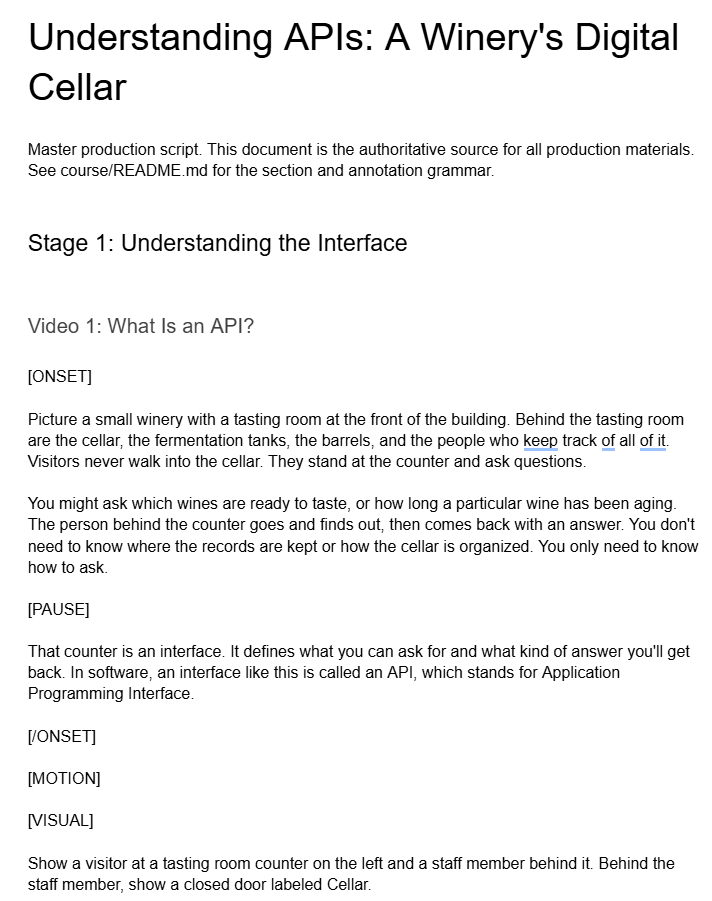
Figure 1. The master script organizes content by stage and video, with tagged production sections inside each.
Worth being clear about what this is and isn’t an argument for. I used an AI coding agent heavily while building this thing. What I didn’t do was leave one in the pipeline. Those are different decisions, and conflating them is how you end up with an interpretive layer in a transformation whose rules you could have written down. Use a model where the rules aren’t knowable. Where they are, write the rules.
A parser turns the source into a structured intermediate representation. Validation checks that sections are well formed and that the expected course structure is present. Only then does the generator prepare outputs.
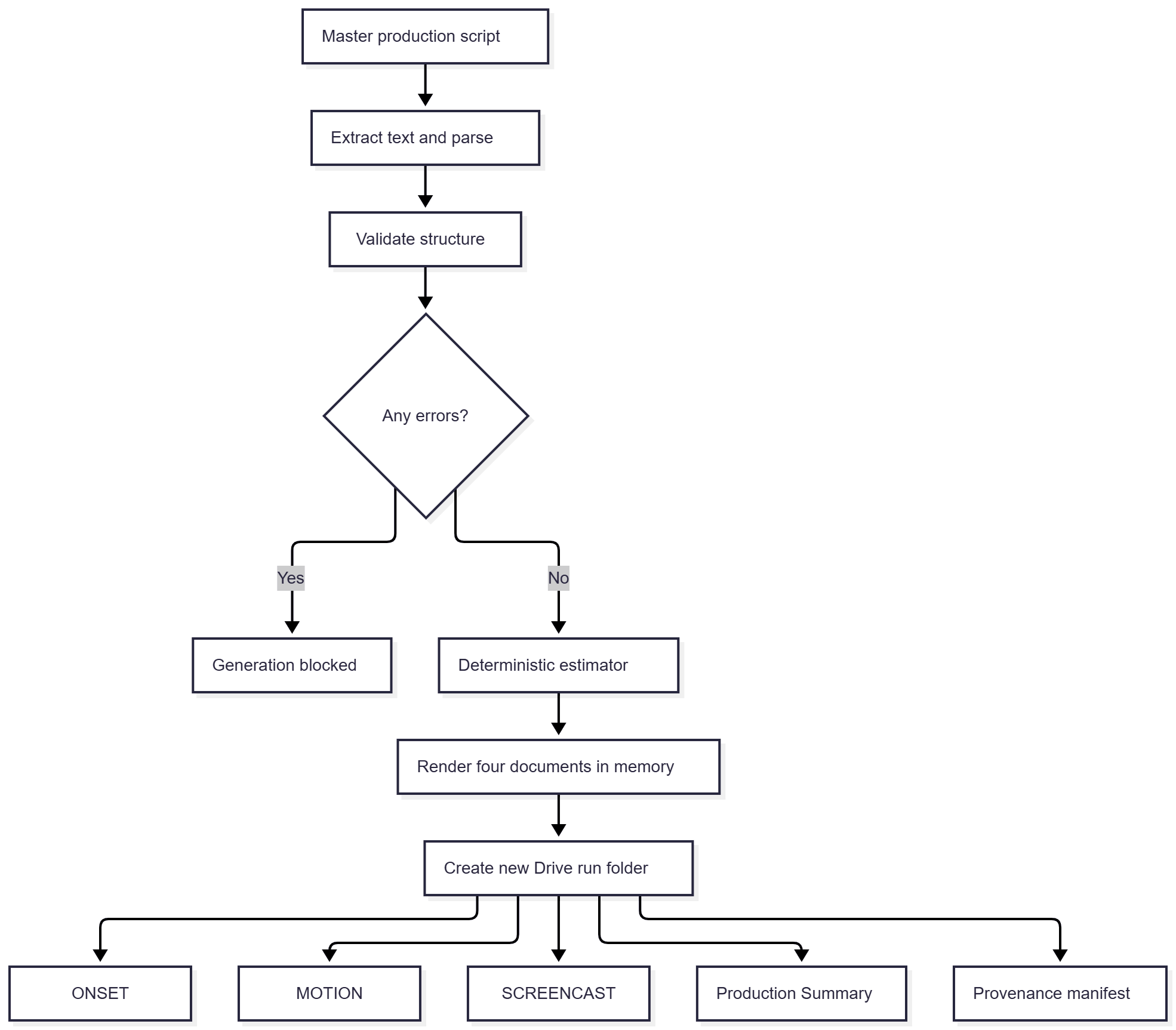
Figure 2. The pipeline. Validation sits between parsing and any Drive write, so a malformed source produces diagnostics instead of documents.
The separation matters. Parsing establishes what the document says structurally. Validation decides whether it is safe to proceed. Estimation calculates values under stated assumptions. Rendering turns validated data into documents for different readers. None of those steps needs to invent missing content.
One source, different readers
The example course contains two stages, six videos, and thirteen production sections: six ONSET, three MOTION, four SCREENCAST. Some videos combine a presenter introduction with a screencast. Others use motion graphics, or return to the presenter after a demonstration.
That last case is the useful one for testing. “Handling Errors,” the second video of stage two, runs ONSET → MOTION → SCREENCAST → ONSET, which means a single video contains two distinct presenter segments separated by other production material. The generated ONSET document identifies them as Part 1 of 2 and Part 2 of 2 rather than running them together as though the presenter never left.
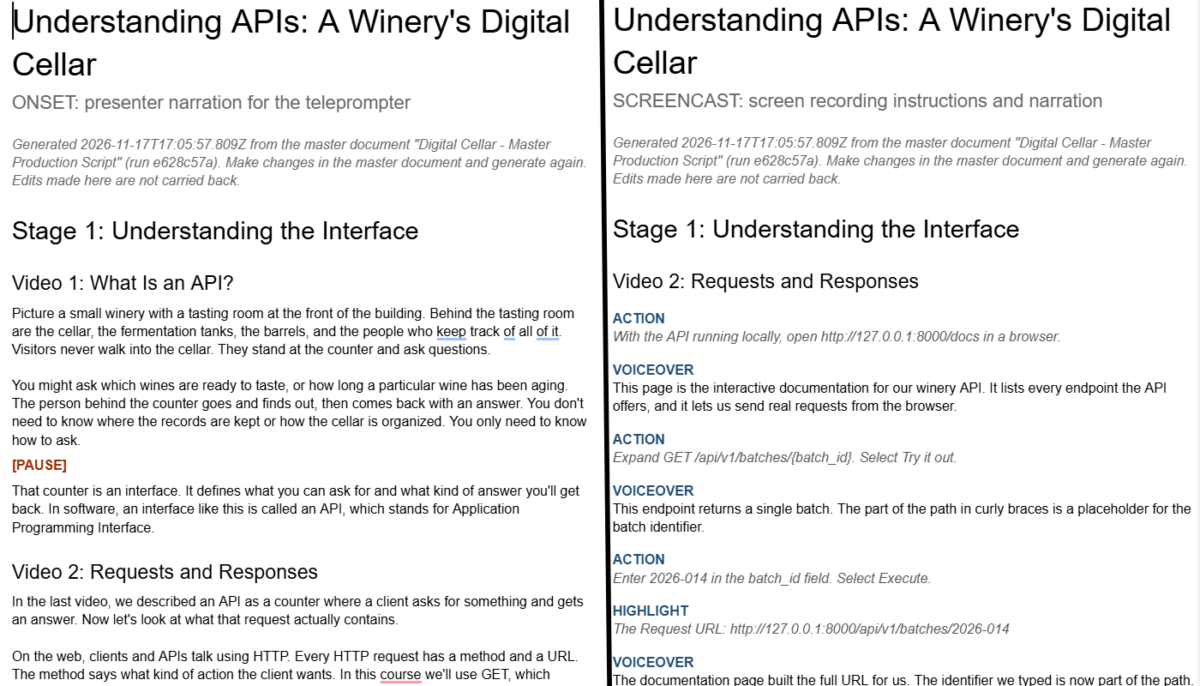
The ONSET document carries narration and pause cues without the screencast directions. The SCREENCAST document preserves the sequence of actions, highlights, and voiceover, including example API requests and JSON responses. The MOTION document serves the animation role. The Production Summary provides counts, estimates, and warnings across the course.
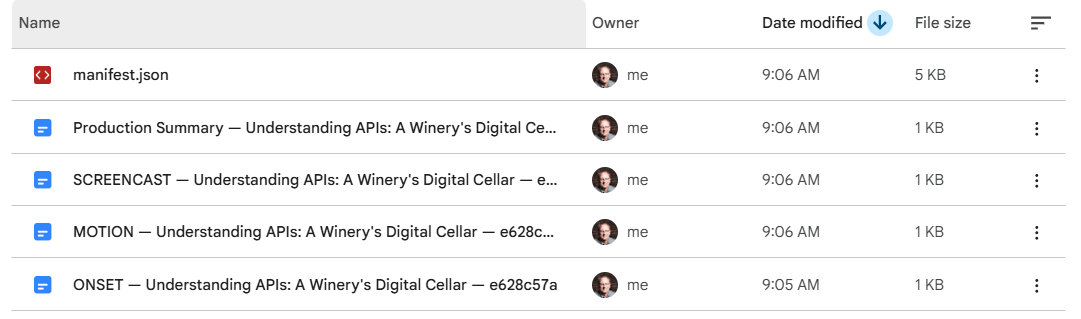
Figure 3. Each run creates a new folder: four role-specific documents plus the manifest that records how they were made.
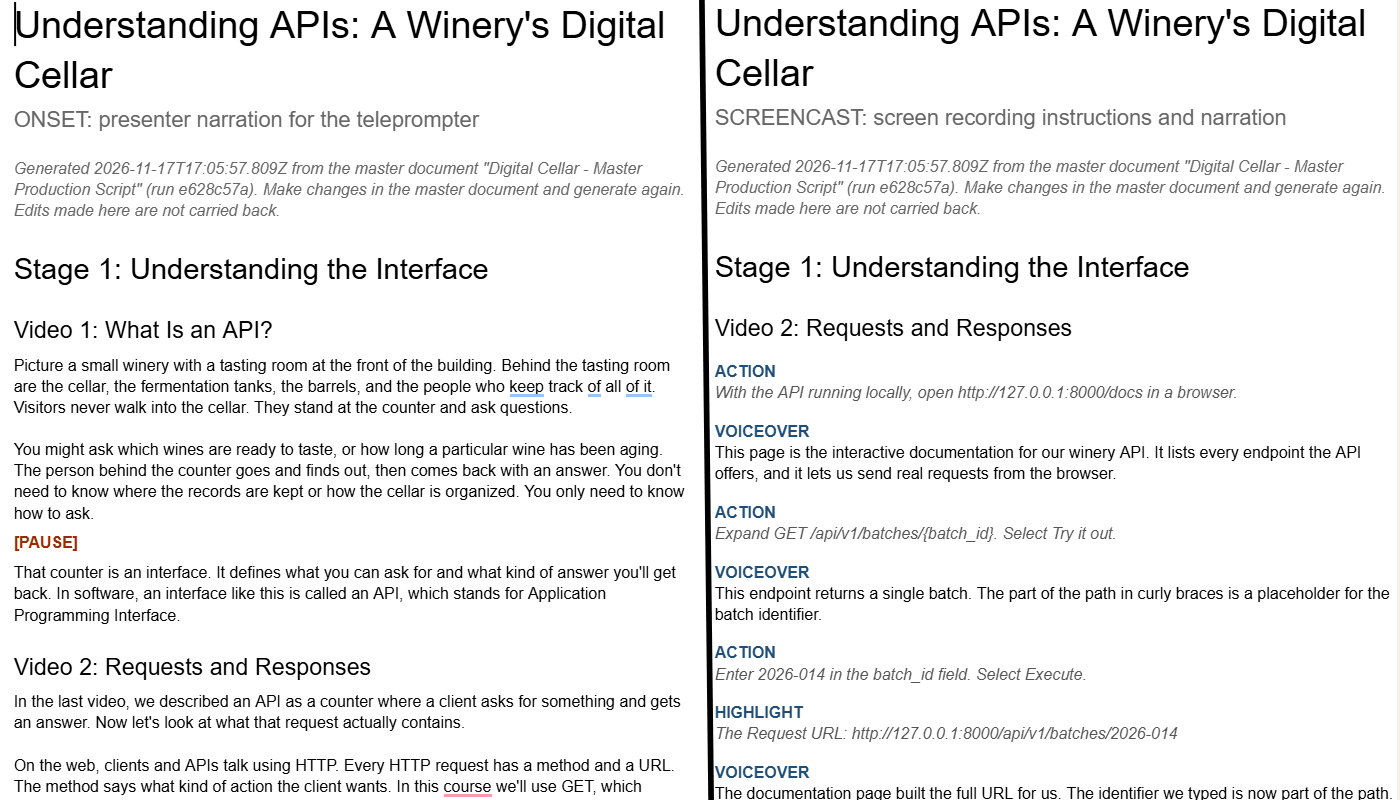
Figure 4. The same source, two readers. The presenter gets narration and pause cues. The screencast producer gets actions, examples, and voiceover.
These aren’t four independently authored interpretations of the script. They are four views of the same validated structure. An editor changes the master document and runs generation again, and the previous output set remains a snapshot of the earlier run.
A validation gate before any Drive writes
The most important feature may be what happens when the source is wrong.
The project includes deliberately malformed script fixtures: missing closing tags, unexpected closing tags, nested production sections, unknown annotations. The parser returns diagnostics with source locations rather than trying to repair the document silently. Validation runs before output creation, so a malformed source blocks generation and the workflow never produces a polished-looking set of documents from a broken script.
That’s a modest rule. It’s also the difference between automation that produces files and automation that enforces a contract.
It also creates a useful exercise: introduce an error into a copy of the master script, read the diagnostic, confirm that generation is blocked, correct the source, run validation again. The failure is part of the lesson rather than something to hide from the learner.
A polished success path shows what a tool can do. A controlled failure shows what the system actually guarantees, where the boundary sits, and how to recover. I’ve written before about tests that cannot fail, and a generation step with no negative control has the same problem: it certifies nothing, confidently.
Estimation is not observation
The fourth document adds a production estimate. The estimator counts spoken words from ONSET narration and VOICEOVER blocks, excluding directions such as ACTION, VISUAL, and HIGHLIGHT. At the default assumption of 140 words per minute, it calculates narration duration per video, and videos over a configurable threshold get a warning.
That sounds straightforward until the numbers acquire an undeserved aura of precision. A word count is an observed property of the script under a counting rule. A duration is a calculation from an assumed speaking rate. Actual recording time includes pauses, interactions, retakes, animation, and editing choices the model doesn’t capture.
So the Production Summary states its rules rather than describing them. The counting rule, verbatim from the generated document:
A word is a whitespace-separated token with at least one letter or digit. Contractions, hyphenated terms, numbers, and URLs or code in narration each count as one word, as written.
It also states its rounding policy: durations round to the nearest second for display, while totals and the threshold check use unrounded values, so a displayed value can sit exactly at the threshold and the displayed per-video figures may not add up precisely to the total.
And where an assumption has no evidence behind it, it says so. The screencast allowance is configurable and currently set to zero seconds per section, which makes every figure a narration-only estimate. The document is explicit that this “isn’t a claim that screen actions take no time; no evidence-based figure has been set.” I find that distinction worth more than a plausible guess would be.
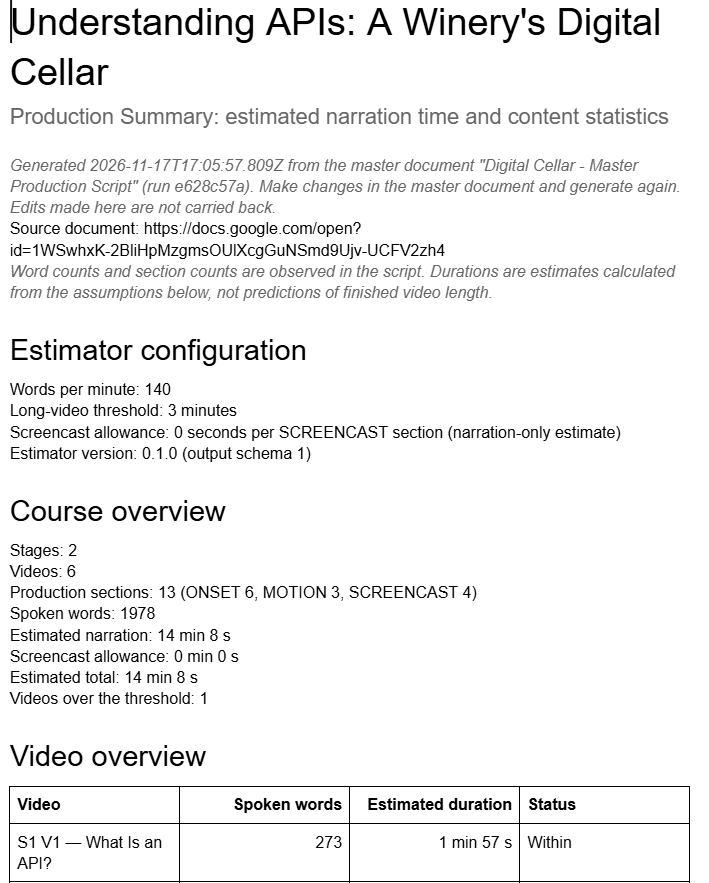
Figure 5. The Production Summary: counted words, estimated duration, and threshold status per video, with the assumptions stated underneath.
In the current live run, the six videos contain 1,978 counted spoken words and an estimated 14 minutes 8 seconds of narration at 140 words per minute. One video trips the three-minute warning: “Handling Errors,” at 664 words and 4 minutes 45 seconds. The hardest video to parse correctly turns out to be the one the estimator flags as too long, which is a coincidence I enjoyed more than I should have.
An earlier run counted 1,980 words. An editorial revision reduced the count by two, which is exactly the kind of drift the manifest exists to make legible.
The estimator also annotates counts that deserve suspicion. Four of the six videos carry notes like “includes 2 URL, path, or code tokens that may take longer to narrate,” because a URL read aloud is one word by the counting rule and considerably more than one word of speech.
The point isn’t that 14 minutes 8 seconds will be the final course runtime. It’s that the estimate is reproducible, its assumptions are visible, and a change to it can be explained.
The manifest is part of the deliverable
Every generation run creates a new output folder rather than overwriting an earlier set. Alongside the four Google Docs, a JSON manifest records the source document reference and the hash of its text, the parser and estimator versions and their hashes, the configuration, output references, counts, and warnings.
{
  "schemaVersion": 2,
  "status": "complete",
  "runId": "e628c57a",
  "generatedAt": "2026-11-17T17:05:57.809Z",
  "source": {
    "documentId": "1WSw...zh4",
    "documentUrl": "https://docs.google.com/open?id=1WSw...zh4",
    "documentTitle": "Digital Cellar - Master Production Script",
    "lastUpdated": "2026-11-17T17:03:46.454Z",
    "extractedTextSha256": "bd8dfd4e8366f0b42b1ecaf381a9b5d44cee7412673aedeaf01108e366fa2c8a",
    "extractedLineCount": 410
  },
  "parser": {
    "version": "0.1.0",
    "coreSha256": "b5c678e69a36b1fd655d61b454eea156b37b78d839ec1342d34c27dab61ec8fc"
  },
  "estimator": {
    "schemaVersion": 1,
    "version": "0.1.0",
    "coreSha256": "00343c8a147b1792db7b840a80b91ce25fe194aa8a7ab0d382b38506770e08bd",
    "config": {
      "wordsPerMinute": 140,
      "longVideoThresholdMinutes": 3,
      "screencastAllowanceSecondsPerSection": 0
    }
  },
  "output": {
    "folderId": "1hRU...EEE",
    "folderUrl": "https://drive.google.com/drive/folders/1hRU...EEE",
    "folderName": "Digital Cellar Production — 2026-11-17 170557 UTC — e628c57a",
    "documents": [
      // four entries, one per generated document
    ]
  }
  // counts and warnings follow
}
Figure 6. The run manifest. Document identifiers are truncated; the hashes and configuration are as generated.
That manifest doesn’t prove the narration is pedagogically effective, or that a human approved every sentence. It establishes something narrower and more useful: which source and which transformation logic produced a particular set of artifacts. If two runs differ, there’s a record to investigate instead of file modification times and memory.
The distinction matters because it’s easy to oversell. A record of what a system did is not a judgment that what it did was right. It just means the question has an answer.
The generated documents carry a notice that edits made there do not flow back into the master. That boundary prevents a common misunderstanding: a derived document is not a second authoritative copy simply because Google Docs makes it editable.
Where the implementation stays small
The parser and estimator are portable JavaScript components tested outside Google Apps Script. The Google integration handles document extraction, formatting, Drive operations, and manifest creation. Automated tests cover parsing, estimation, and the Apps Script adapter with service doubles, though live Google Docs runs are still necessary to verify actual formatting and authorization behavior.
The master Google Doc can also use native heading and title styles without changing the transformation, because the parser works from the extracted text and explicit annotations rather than the document’s visual formatting.
The limits are real and chosen. The source grammar has no explicit code-example annotation yet, so the screencast renderer uses a documented convention for examples following certain direction lines, which works for this course and is not a universal code detector. The runtime estimate is not a scheduling model. The project doesn’t synchronize edits back from generated documents, and it doesn’t use a model to interpret the script during generation.
A teaching project gets harder to understand when every possible extension is implemented before anyone can reproduce the core workflow.
The lab, and why the teaching material is tested too
The published learning lab offers a roughly one-hour, local-first path from inspection to verification, plus an optional Google Docs generation extension. Learners don’t need a Google account for the core exercises.
The sequence moves from inspection to verification. Examine the structured script. Parse it locally. Compare its structure against an independently maintained fixture. Deliberately break a tag and read the diagnostic. Change an estimation assumption and see what moves. Compare two example manifests. Then, optionally, connect a Google account and generate a real run.
The part I’m most pleased with is less visible: the lab’s instructional commands and expected outputs are checked against the repository in CI. If the implementation changes and the teaching material stops matching it, the build fails. Documentation drifting away from the code it documents is the same failure as four production documents drifting away from one script, and it would have been faintly embarrassing to write this article without closing that loop. The teaching material is held to the contract it teaches.
The automation could have stopped at four Google Docs and a manifest. But a working project becomes more useful when someone else can reproduce its behavior, including the failures. That’s the progression I tend to favor: inspect the system, change one thing, observe the result, explain the evidence. It asks a better question than “did the script run?” The better question is can you explain exactly why this output differs from the previous one?
Where else would this approach help?
A production script is one instance of a broader pattern: one structured source, several audiences, and a set of transformations that should not quietly disagree. The interesting question isn’t whether we can generate more files. It’s whether the outputs share enough rules that the transformations can be described explicitly and tested.
A developer workshop is the closest neighbor. The instructor needs a facilitator guide with timing and teaching notes. Participants need exercises without the answers. A teaching assistant needs checkpoints and troubleshooting guidance. One underlying body of workshop content could produce all three, with deliberate rules about what belongs where, and a changed command wouldn’t require three people to remember three documents.
Certification and assessment programs are the more interesting case, because they add a constraint this project never had to face. A structured question bank could support candidate assessments, reviewer keys, topic coverage reports, and versioned release packages. But now the transformation rules carry a security requirement: answers must never reach candidate materials. That’s an argument for stronger, more explicitly tested boundaries, not against the pattern. A rule you can state is a rule you can test, and “the candidate document contains no ANSWER blocks” is a very testable rule.
Documentation sets, release records, and onboarding programs have similar shapes, with different readers drawing on facts that ought to stay consistent.
None of this means every paragraph should live in one enormous master file. Some material genuinely needs separate authorship and editorial judgment. The approach earns its keep where the shared facts, the roles, and the transformation rules are explicit enough to validate. Where the rules aren’t knowable, deterministic generation is the wrong tool, or at most one part of the workflow.
What this experiment demonstrated
A single source of truth is not just a file everyone agrees to edit. It needs a defined structure, validation rules, reproducible transformations, and clear boundaries around derived artifacts. Otherwise “one source” is a convention people can violate by accident.
This project started with a fictional winery API and a six-video course script. It ended with a small document production pipeline: one structured input, four role-specific Google Docs, a validation gate, deterministic runtime estimates, and a manifest for each run. Whenever several teams need different views of the same underlying content, the first question may not be how to write each document faster. It may be how to stop writing the same facts four times.
The winery theme made the example more enjoyable. The reproducible workflow is the part I’d reuse.
The code and the lab are both on GitHub. If you try either, a star is a useful signal: whether this gets a second version depends on whether the pattern is useful to anyone besides me, and I’d rather settle that with evidence than a hunch.
Open the learning lab · Star the repository
If you’ve solved a version of this coordination problem differently, I’d like to hear it. That’s the thread I’d most want in the comments.